When the rain gets in the way.
Situational accessibility in monsoon — making Uber's pickup glanceable and low-effort when one hand holds an umbrella and the screen is wet.
- Role
- Product / UX Designer
- Tools
- Figma · Notion · Surveys · Interviews
- Platform
- Mobile app
- Scope
- End-to-end research, design and documentation
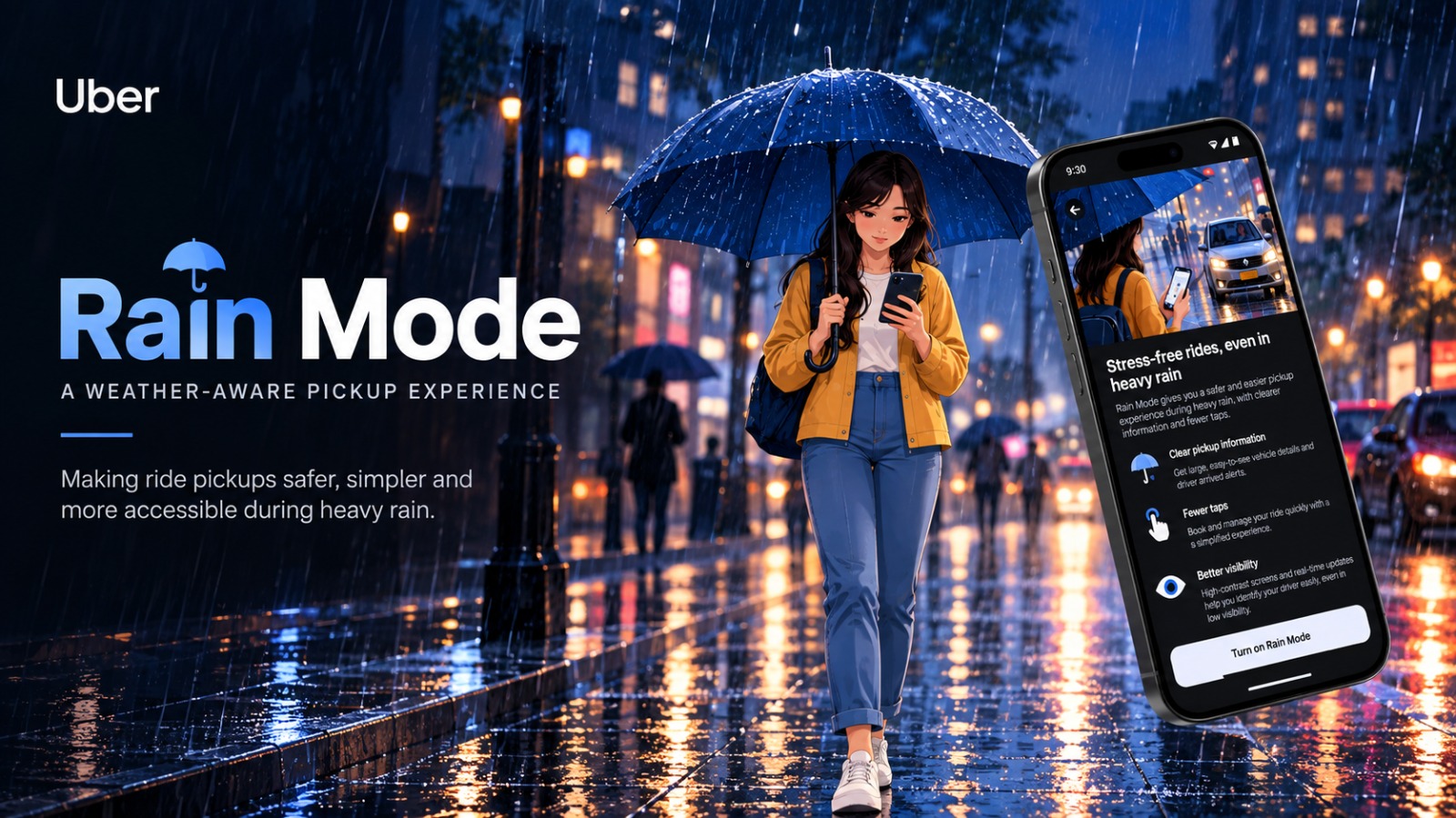
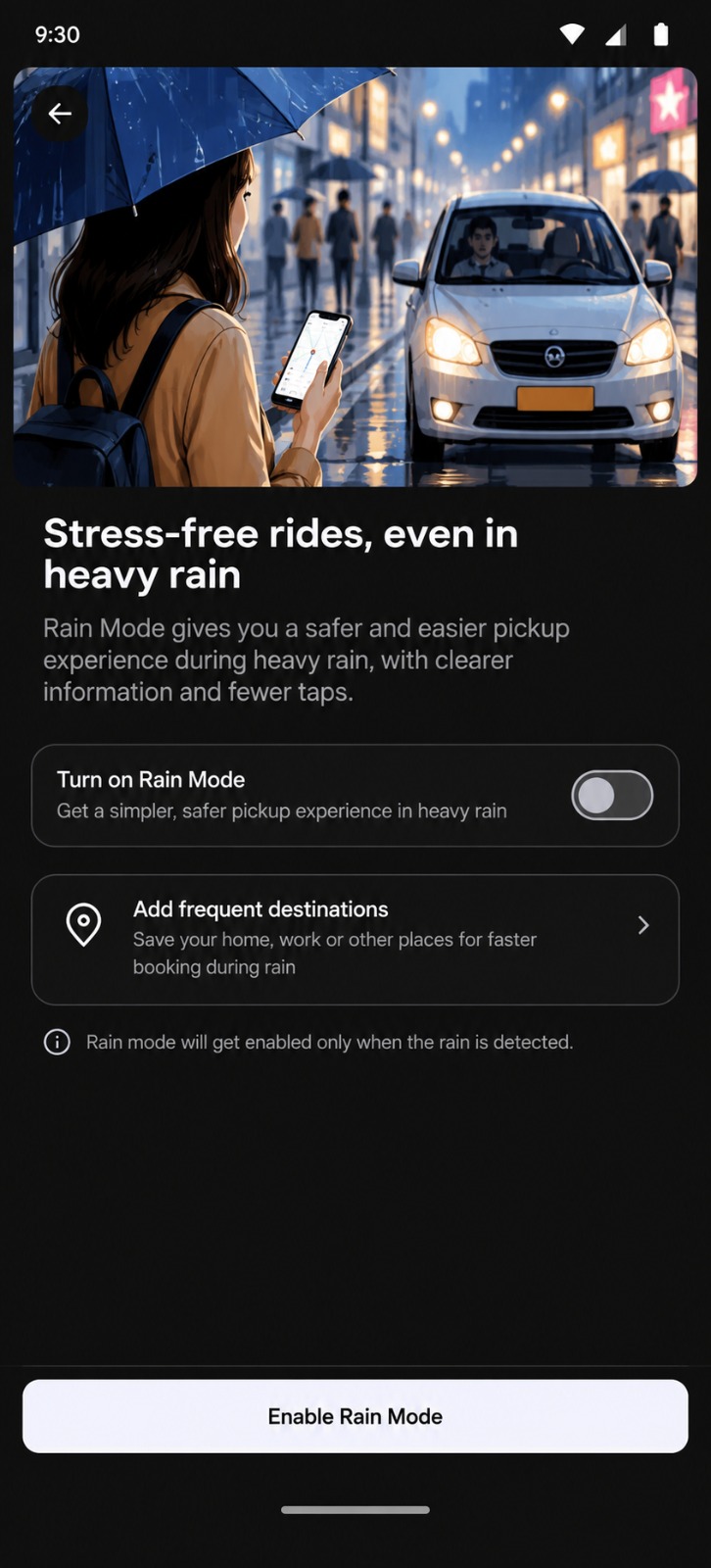
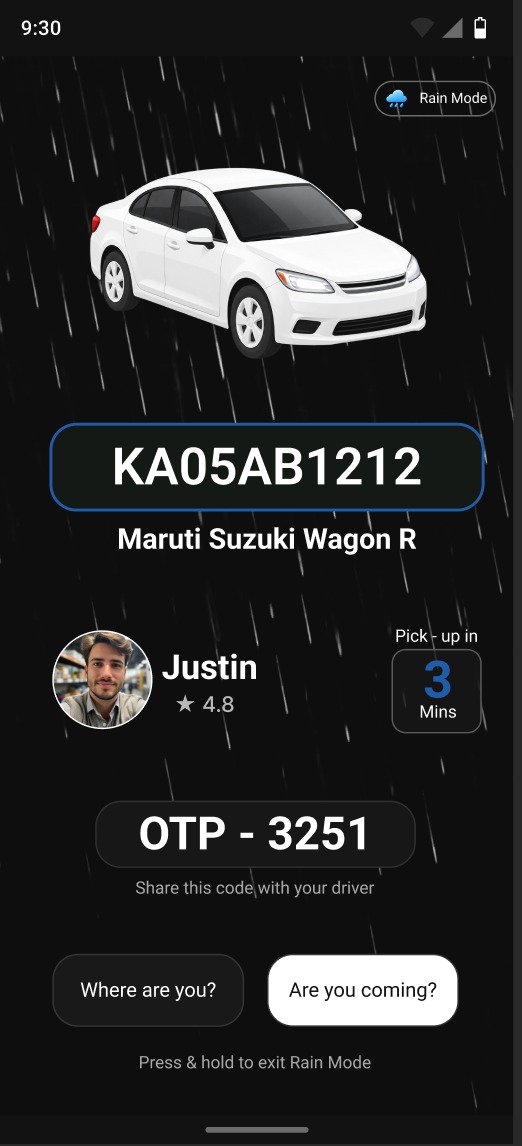
When a simple pickup becomes a difficult interaction
Booking a ride is usually effortless: check the screen, tap a button, read the details, listen for the driver, and walk to the pickup point.
But during a heavy monsoon, that familiar journey changes. An umbrella occupies one hand. Rain covers the phone screen. Touch interactions become unreliable. Traffic and crowds compete with audio notifications. Visibility drops, while the pickup timer continues to count down.
The rider hasn't suddenly become less capable. The environment has simply made the existing experience harder to use.
The goal
Create a situationally adaptive pickup experience — one that requires less screen interaction, reduces dependence on audio, and makes critical information easier to access at a glance. Help the rider confirm, find, and reach their Uber without having to fight the rain or their phone to do it.
When the environment changes, the interface should adapt.
How the pickup is handled today — and where it stops
Secondary research compared Ola, Rapido, Namma Yatri and Uber on what the rider gets, what the rider still has to do, and where situational accessibility gaps appear.
| Platform | What the rider gets | What the rider still has to do | Situational accessibility gap |
|---|---|---|---|
| Ola | Live location, ETA, driver & vehicle details | Look at the screen, interpret the information and interact when needed | Information is available, but the interaction doesn't appear to adapt to heavy rain or limited hand availability. |
| Rapido | Live tracking, location sharing & safety tools | Keep the phone accessible for tracking and communication | Strong awareness, but continued phone dependence can become difficult with an umbrella, wet screen and surrounding noise. |
| Namma Yatri | Live tracking + Lock Screen Live Activity | Glance at the phone to understand the ride status | Reduces app switching, but doesn't specifically respond to wet-screen interaction, poor visibility or noisy conditions. |
| Uber | Live tracking, ETA, driver & vehicle information | Look, tap, read and interpret information during pickup | The standard experience assumes a relatively comfortable interaction environment — creating an opportunity for situational adaptation. |
Swipe the table to see every column →
| Platform | Core pickup strength |
|---|---|
| Ola | Live ride tracking & vehicle identification |
| Rapido | Real-time tracking & ride communication |
| Namma Yatri | Glanceable pickup information |
| Uber | Seamless ride tracking & pickup coordination |
Swipe the table to see every column →
Existing pickup capability
- Track the ride
- Identify the vehicle
- Receive live updates
- Glance at information
- Interact with the app
Situational constraint
- Wet or unresponsive screen
- One hand occupied
- Reduced visibility
- Environmental noise
- Need for minimal interaction
When the rain changes the way people interact, the interface should change with it.
What 26 riders told us
The research focuses on riders whose ability to interact with the app temporarily changes because of heavy monsoon conditions. A rider survey and interviews tested where the pickup breaks down.
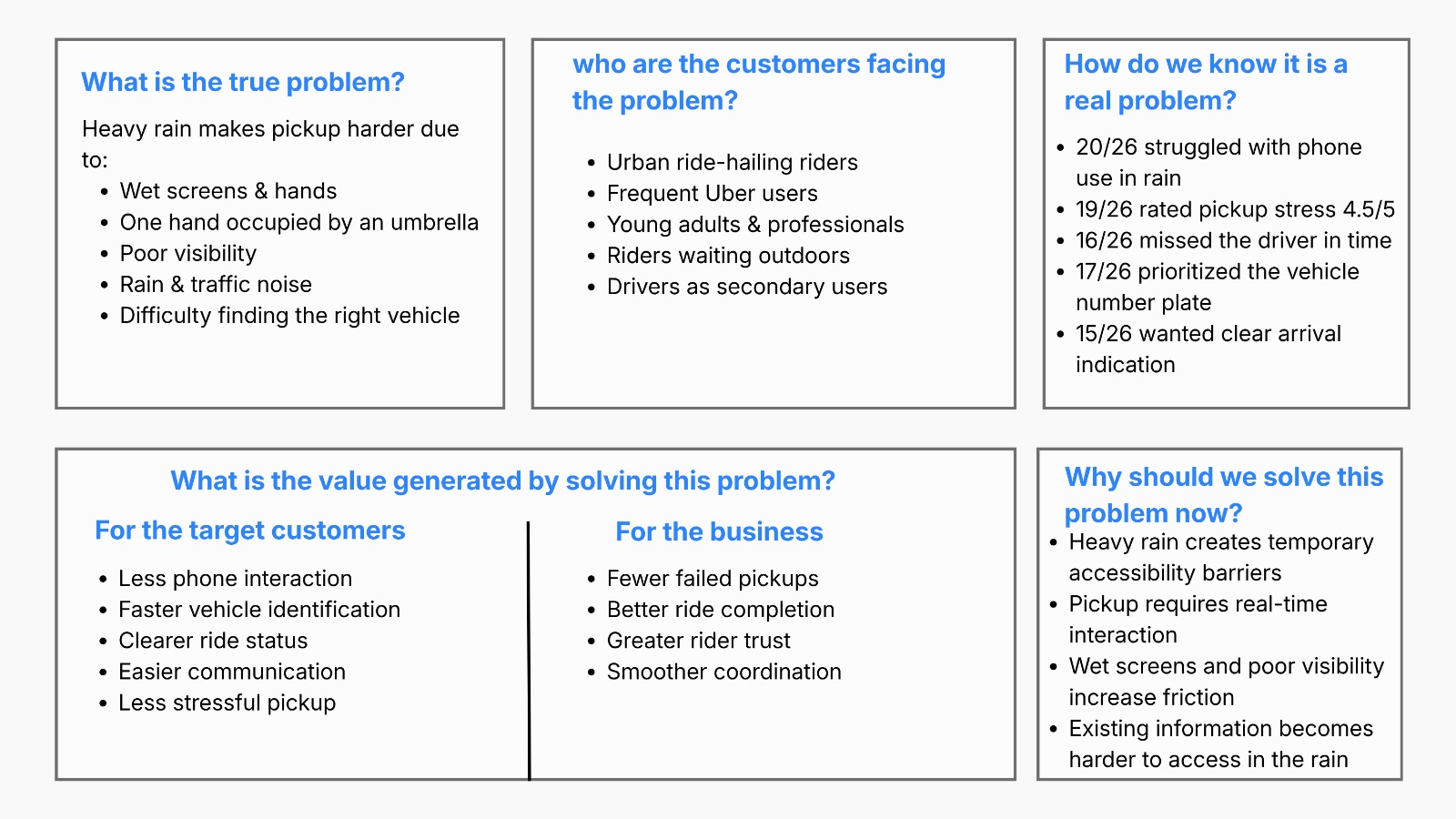
Wet screens, wet hands, one-handed use and inaccurate tapping were the recurring barriers. Riders most often struggled with crowded pickup areas, checking the vehicle number plate, and communicating with the driver.
The insight was simple: when the rain gets in the way, riders need to identify their ride faster, with less interaction.
Key patterns across participants
- Wet screen & phone interaction — participants 2, 3, 4 and 6 had difficulty using or viewing their phones in heavy rain.
- Driver communication — participants 1, 3, 4 and 6 struggled to connect or communicate with their drivers.
- Pickup uncertainty — participants 2, 4 and 6 struggled to locate the pickup point or identify their vehicle.
- Visibility & hearing — participant 4 found rain and noise made it hard to hear the driver and identify the vehicle.
- Ride confirmation & cancellation — participants 3, 5 and 6 mentioned long waits, cancellations, or doubt that the ride was confirmed.
Primary segment — urban riders
- Holding an umbrella while waiting
- Limited hand availability
- Wet or unreliable touchscreen
- Crowded, high-traffic pickup areas
- Poor visibility in heavy rain
- Struggling to hear driver calls or notifications
- Time pressure to locate the arriving vehicle
Secondary segment — drivers
- Difficulty spotting riders in heavy rain or crowds
- Unclear or changing pickup points
- Repeated calls or messages to locate the rider
- Limited visibility around the vehicle
- Delays caused by difficult pickup coordination
18–24 · Young Riders
The independent, mobile-first rider. Needs pickup information that is fast, glanceable and easy to act on. Key need: speed with minimal effort.
25–34 · Young Professionals
The multitasking commuter. Needs to identify the driver and vehicle without prolonged screen interaction. Key need: clarity without interruption.
35–49 · Adults
The practical everyday rider. Benefits from a simplified experience when conditions get challenging. Key need: simplicity in difficult situations.
50+ · Older Riders
The clarity-first rider. Benefits from highly visible information, straightforward controls and alternative communication. Key need: confidence through clarity.
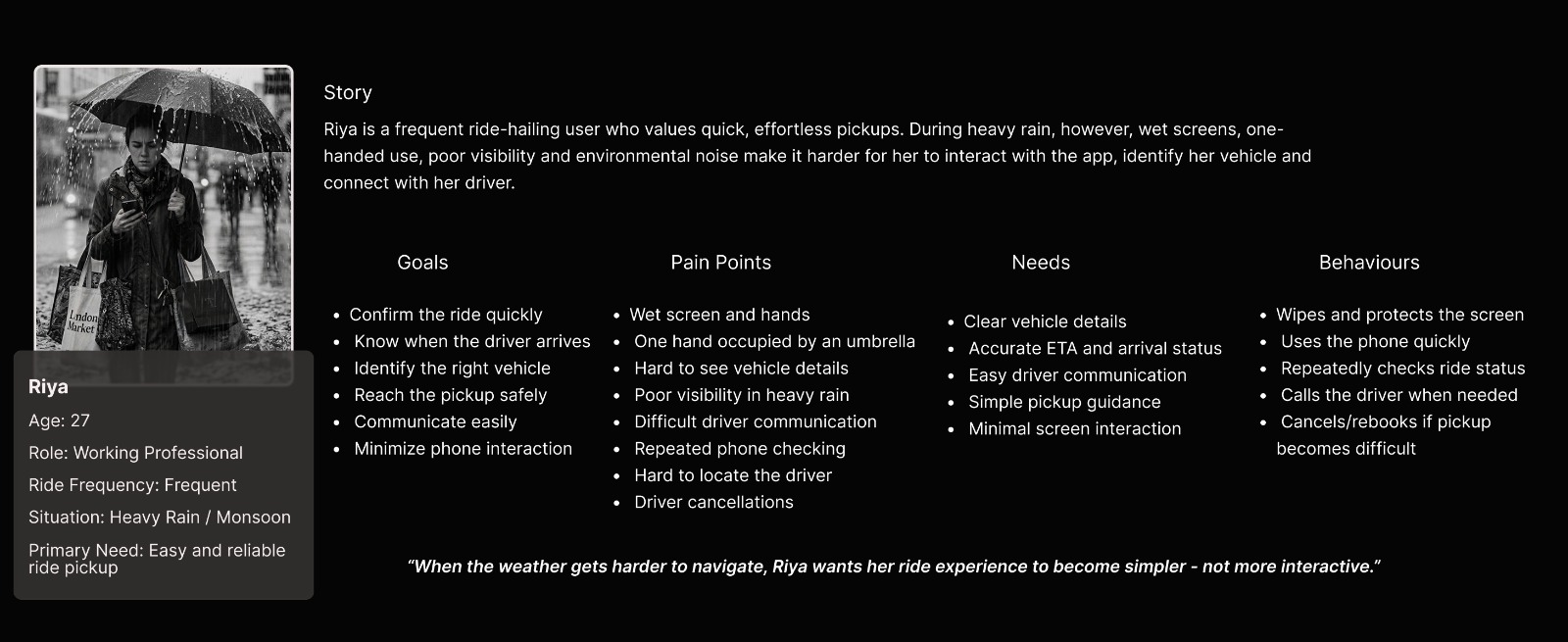
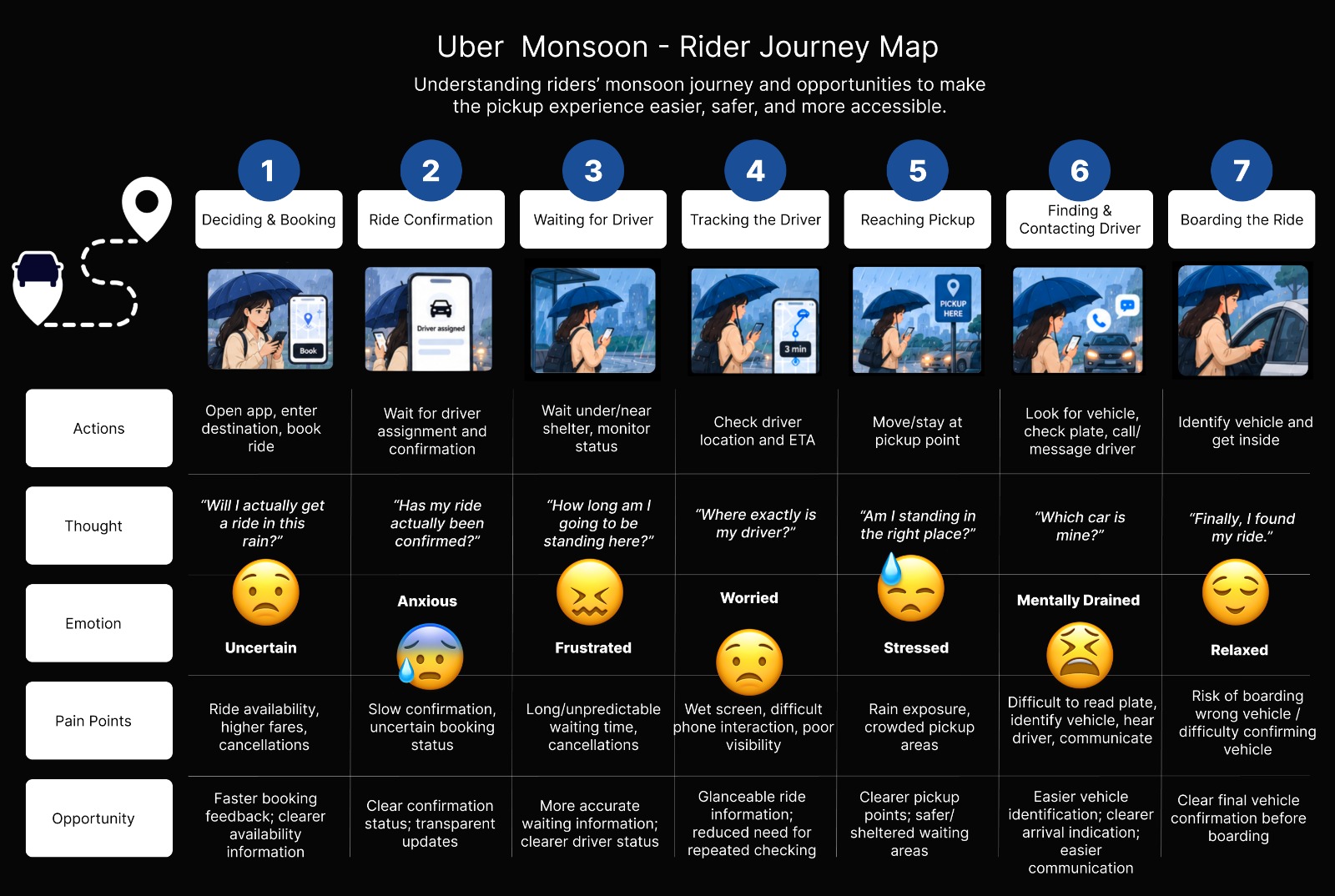
Urban Daily Riders (18–34) — they rely on ride-hailing for work, college and daily travel, manage their own pickup, and are often walking, commuting or waiting outdoors when heavy rain makes phone interaction difficult.
The real challenge is access, not information
Ride-hailing platforms already support tracking, vehicle identification and live updates. The barrier isn't missing information — it's making critical information easier to access when conditions get hard.
Understanding riders' monsoon ride-pickup experience to make booking, tracking, and pickup easier during heavy rain.
One-handed interaction
Make key actions easy to complete with one hand.
Multimodal feedback
Combine visual, haptic, and audio alerts.
Rain-ready interface
Prioritize ETA, vehicle details, and pickup status.
Faster vehicle identification
Highlight the number, colour, model, and driver.
Context-aware pickup
Adapt the experience when heavy rain creates temporary accessibility barriers.
| How might we… | Possible direction |
|---|---|
| Reduce unnecessary phone interaction during heavy rain? | Fewer steps, larger controls |
| Support riders using the phone with one hand? | Thumb-friendly controls |
| Help riders identify their vehicle quickly? | Large plate, colour & model |
| Make critical ride information easier to notice? | Clear ETA, driver & vehicle info |
| Make pickup coordination easier? | Clear pickup point, quick contact |
| Ensure riders notice important updates? | Visual + haptic + audio |
| Reduce uncertainty while waiting? | Assigned → Approaching → Arrived |
| Adapt Uber to temporary rain-related barriers? | Context-aware pickup experience |
Swipe the table to see every column →
When the environment becomes harder, the interface should become easier.
From pain points to a Rain Mode flow
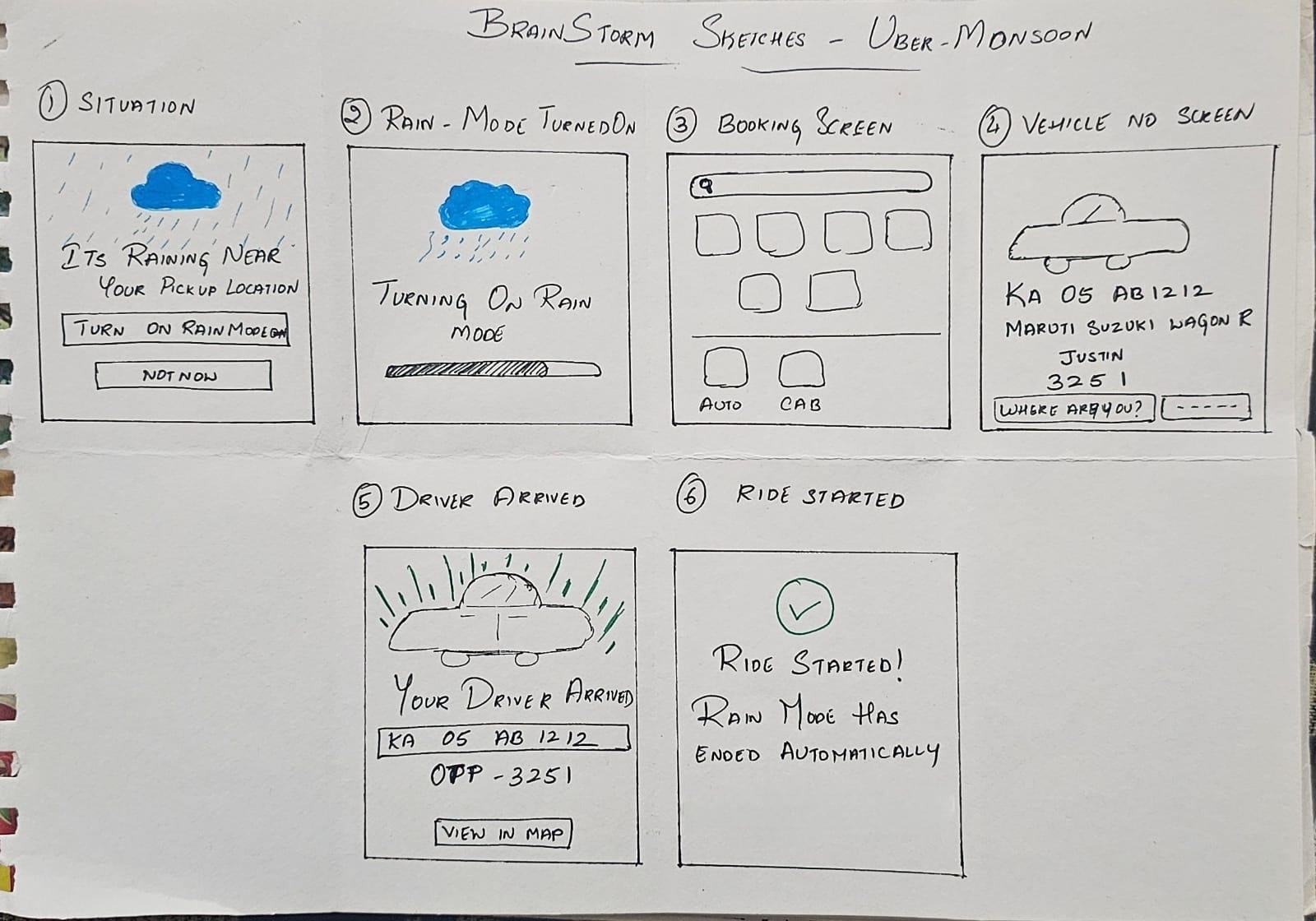
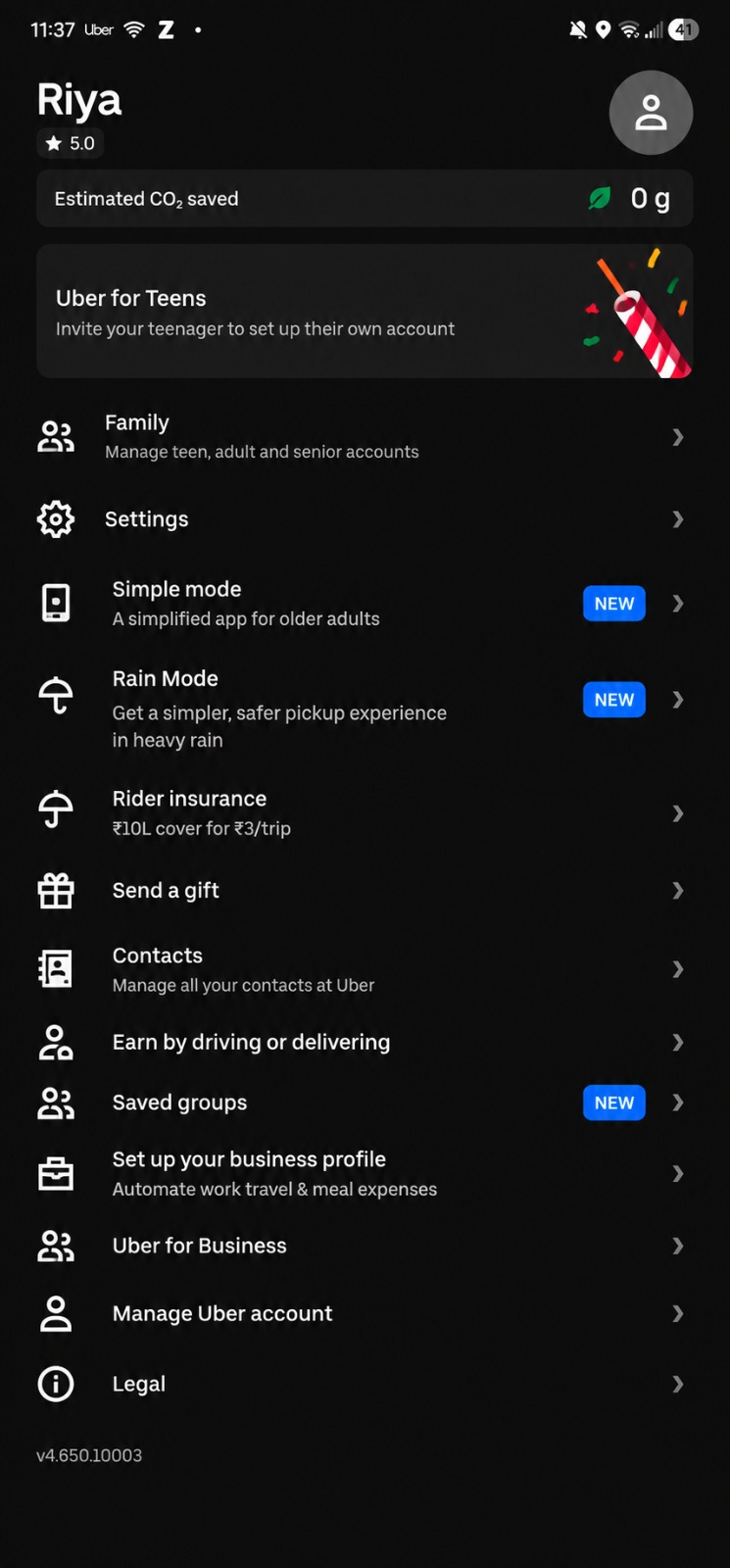
The research pointed to an experience that works with the conditions, not against them: less phone dependency, critical ride information at a glance, simpler vehicle identification, and easier pickup coordination. Brainstorm sketches and low-fidelity wireframes shaped the flow.
Situation — rain detection
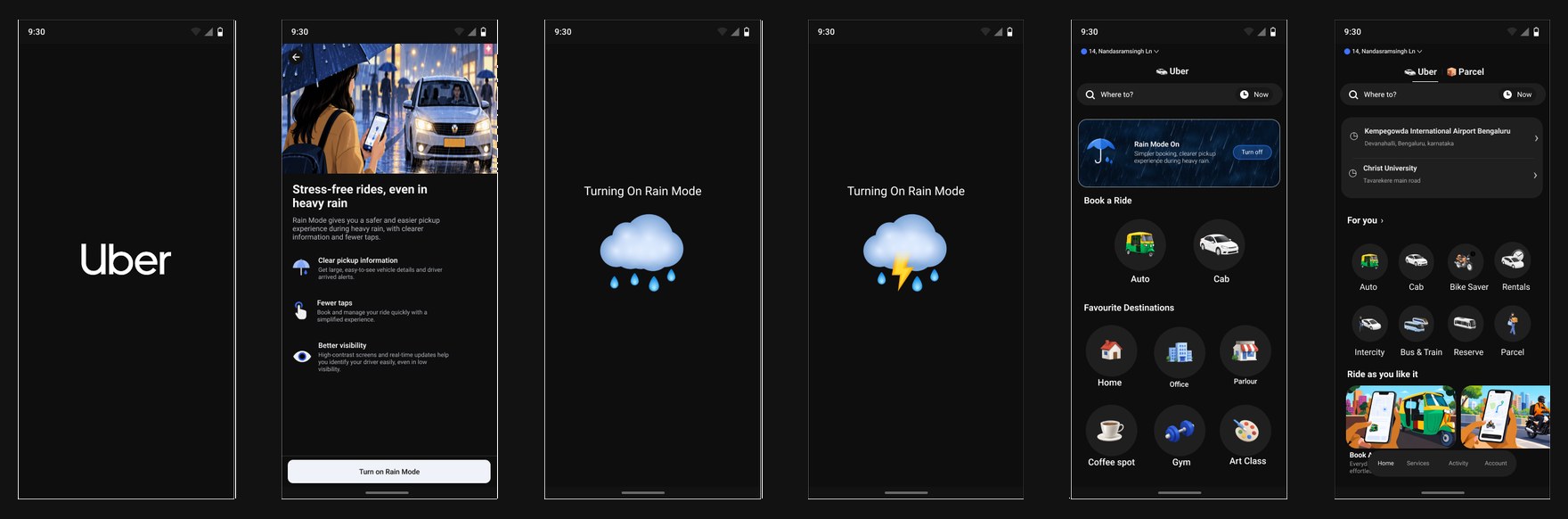
When the rider opens Uber, the system detects heavy rain near the pickup location and prompts them to enable Rain Mode.
Rain Mode turned on
A brief confirmation screen shows the simplified, rain-friendly experience being activated.
Booking screen
The rider books a ride to a saved or favourite destination, reducing the number of interactions.
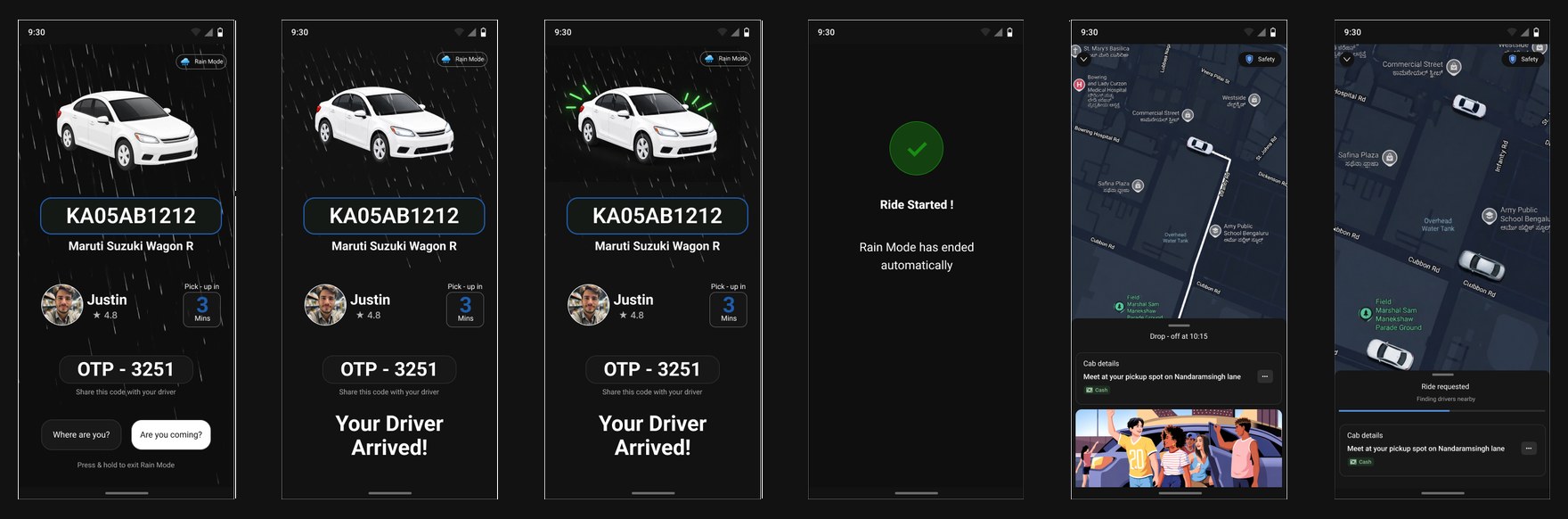
Vehicle information screen
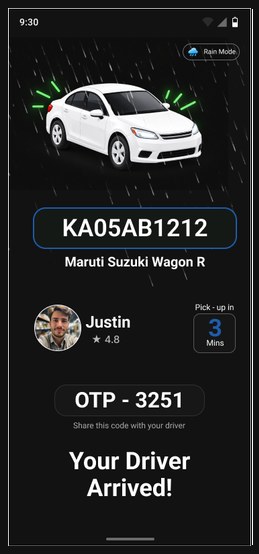
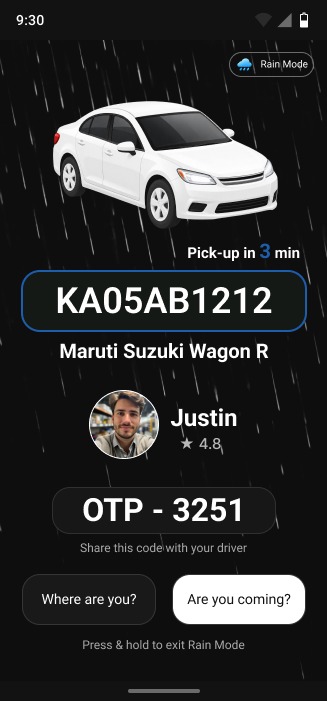
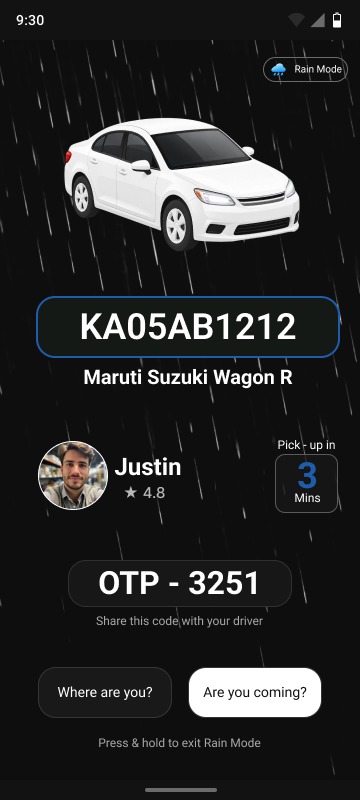
Vehicle number, vehicle name, driver name and quick messaging options appear in a large, easy-to-read format.
Driver arrived alert
A clear visual alert with a blinking light indication and a haptic vibration, noticeable in noisy or low-visibility conditions.
Ride started
After the rider enters the vehicle and gives the OTP, Rain Mode ends and the standard Uber interface returns.
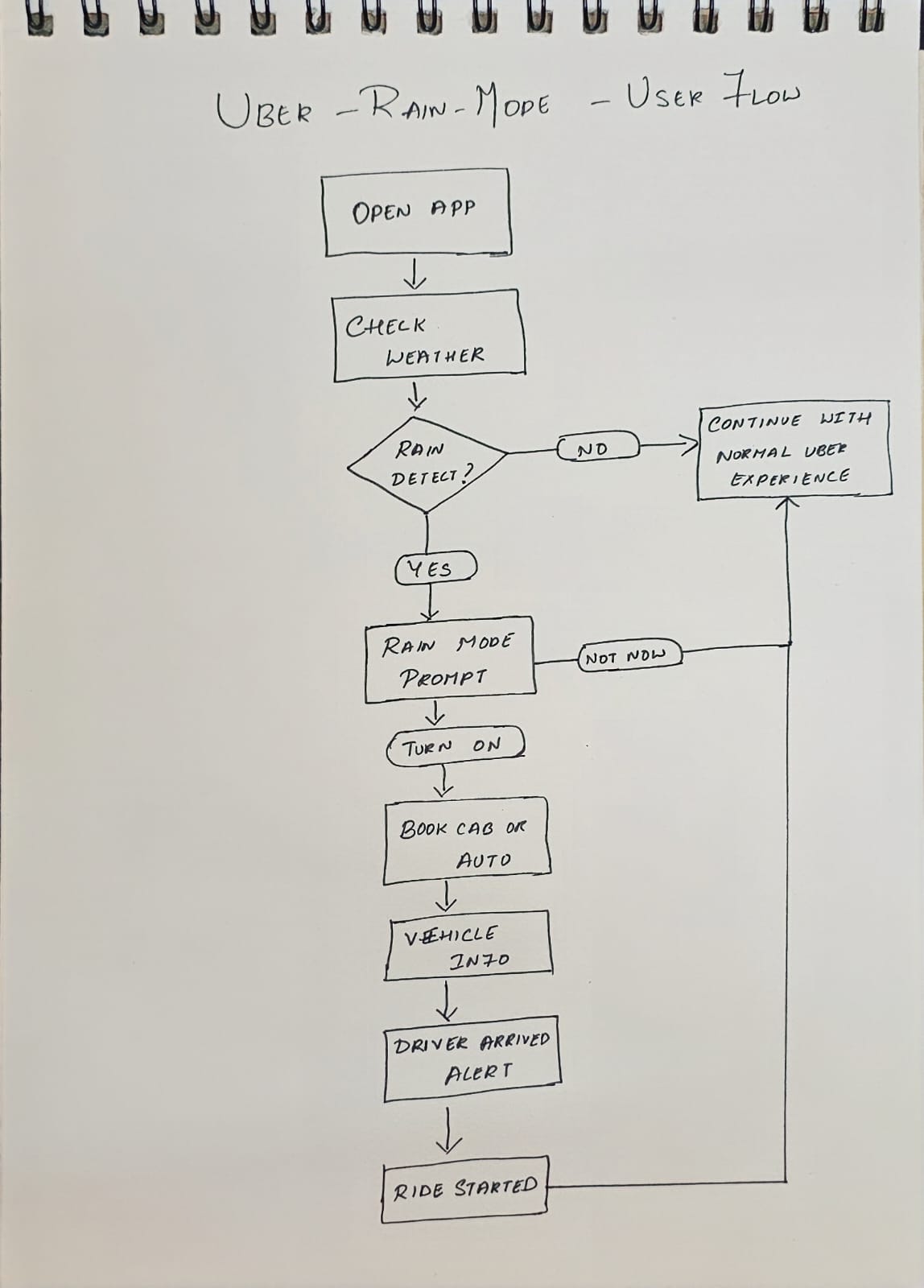
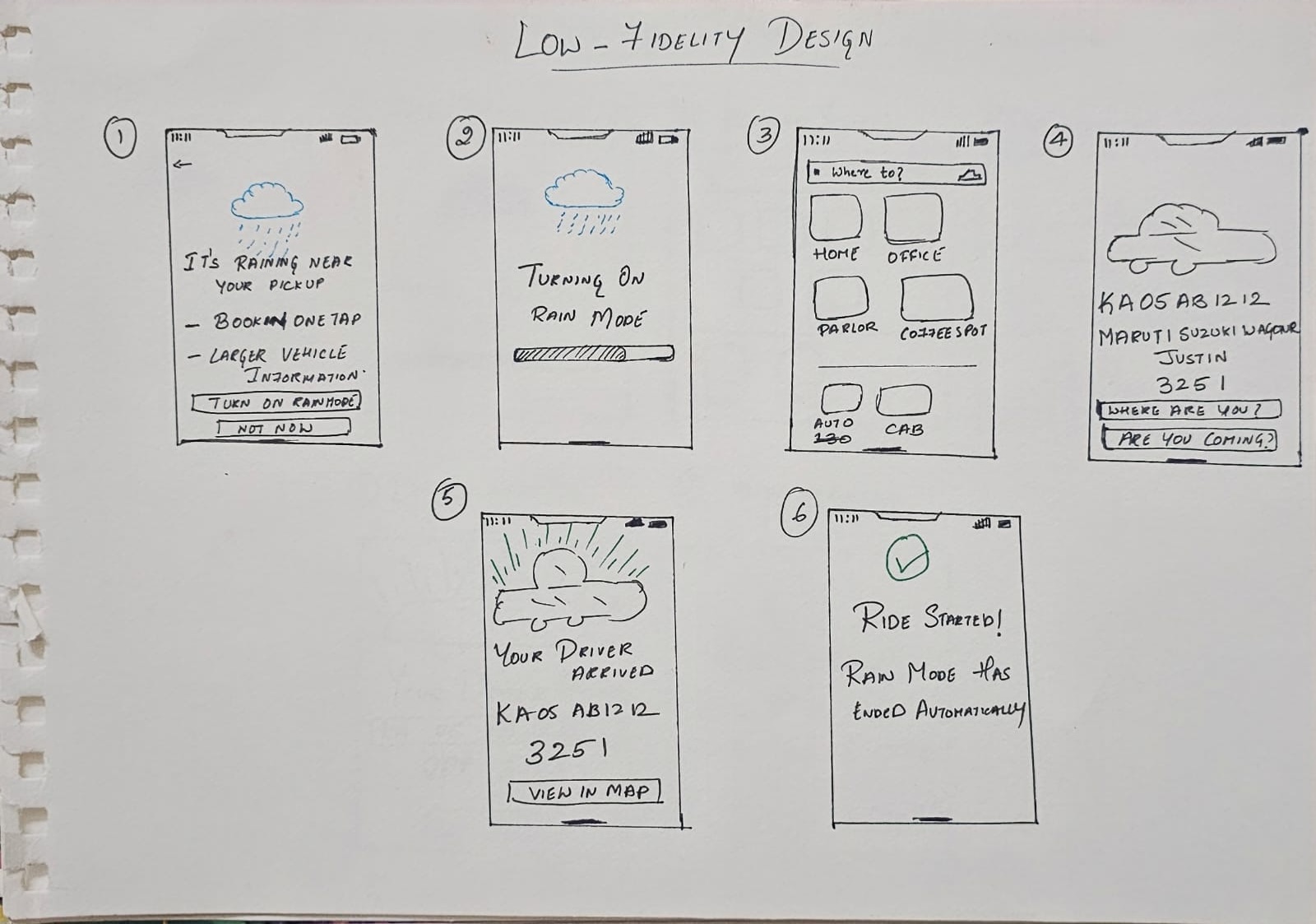
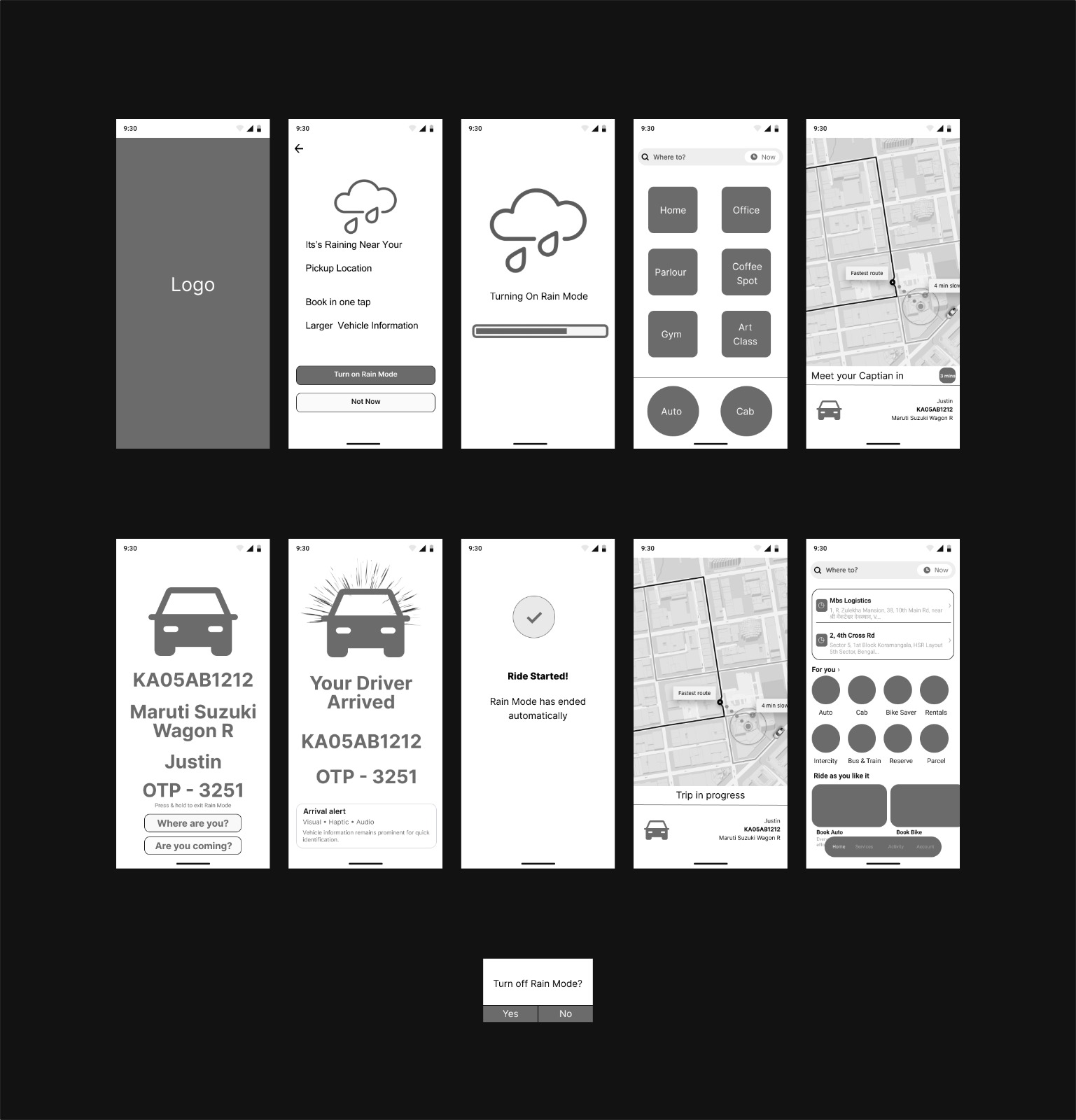
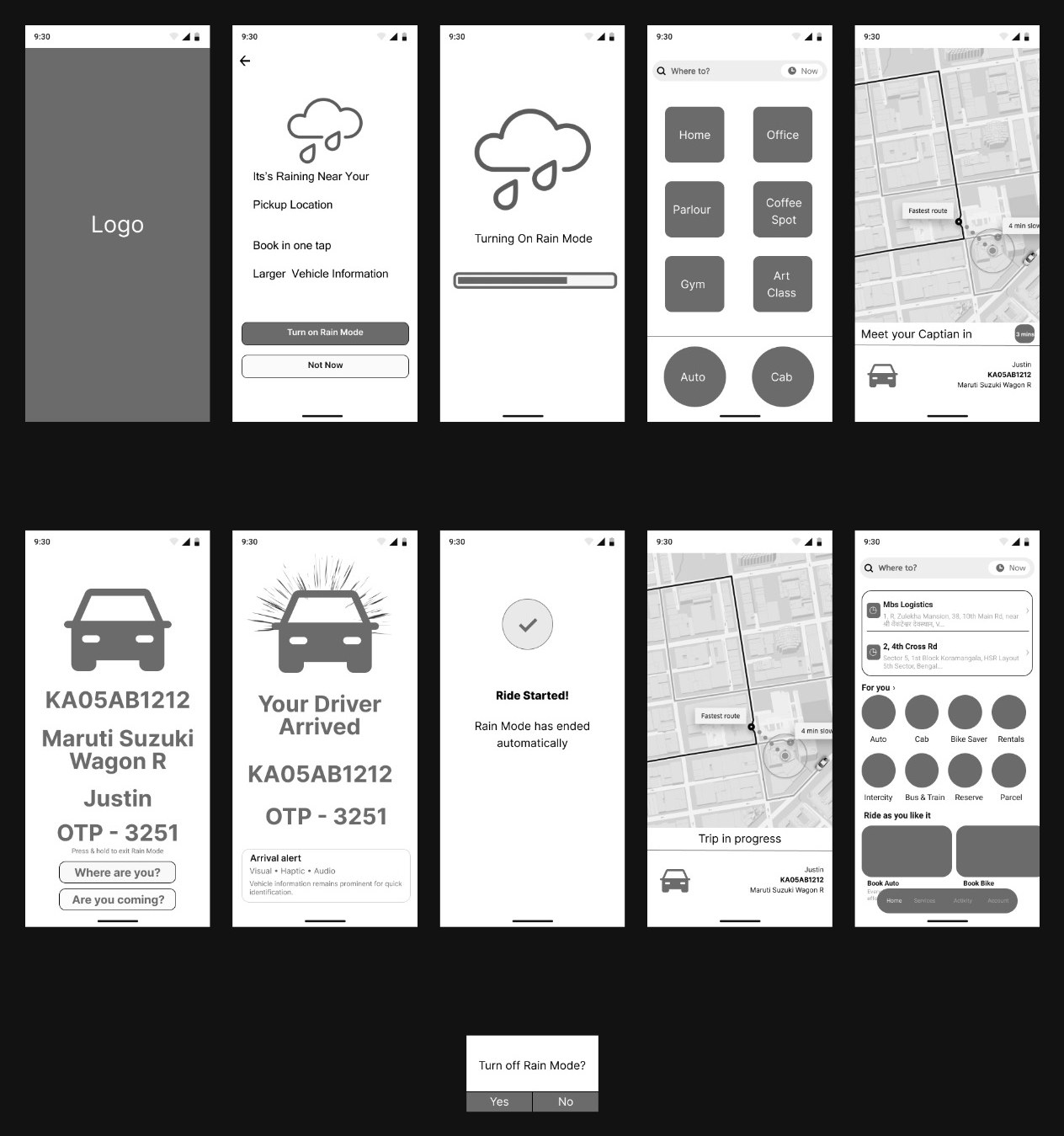
Open Uber → Detect heavy rain → Rain Mode prompt → Enable → Book ride → Large vehicle details → Driver arrival alert → Locate & meet vehicle → Ride starts → Rain Mode ends
A high-fidelity Rain Mode, tested with riders
The concept was refined into a high-fidelity, interactive Uber experience that reduces phone interaction, improves vehicle visibility, simplifies pickup coordination and makes critical ride information easier to access in the rain.
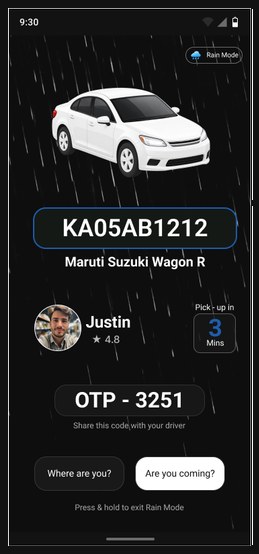
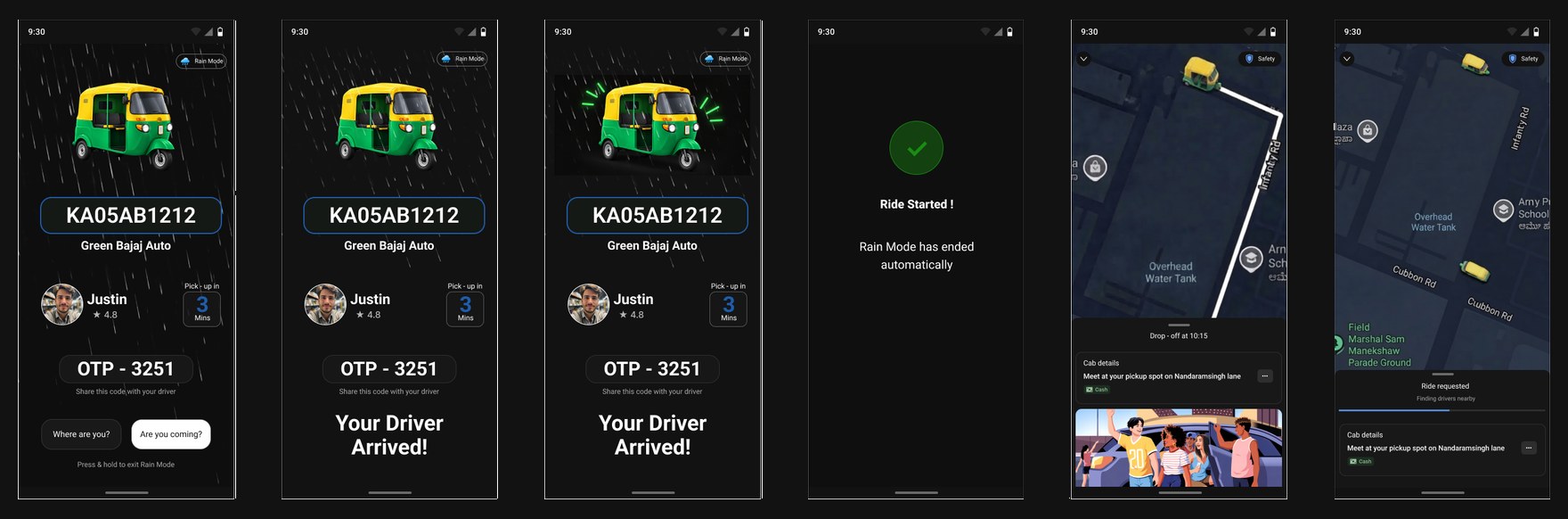
Multimodal pickup alerts
When the driver arrives, the rider gets a haptic alert, while the vehicle number and OTP appear in high-contrast, high-visibility UI. Audio feedback supports moments when riders can't keep looking at their phone.
Prototype note: because of Figma's prototyping limits, haptic feedback is shown as an on-screen vibration indicator. Audio and the increased brightness / high-contrast treatment are design considerations rather than fully simulated interactions.
Context-aware Rain Mode
Adapts the pickup experience during heavy rain.
Glanceable ETA
Makes driver arrival time easy to see at a glance.
Clear vehicle identification
Highlights the vehicle number, colour, model and driver.
Clear pickup guidance
Makes the pickup and meeting point easier to follow.
Multimodal arrival alerts
Uses visual, haptic and optional audio alerts.
Simplified interaction
Reduces taps and phone interaction during pickup.
| User problem | Design response |
|---|---|
| Wet screen / wet hands | Larger controls and simplified interaction |
| One hand occupied by umbrella | Thumb-friendly interaction |
| ETA difficult to notice | Large, prominent ETA |
| Vehicle difficult to identify | Large vehicle number + model |
| Driver arrival may be missed | Strong arrival indication |
| Rain and traffic noise | Visual + haptic feedback |
| Pickup point confusion | Clear pickup guidance |
| Repeated phone checking | Glanceable ride information |
Swipe the table to see every column →
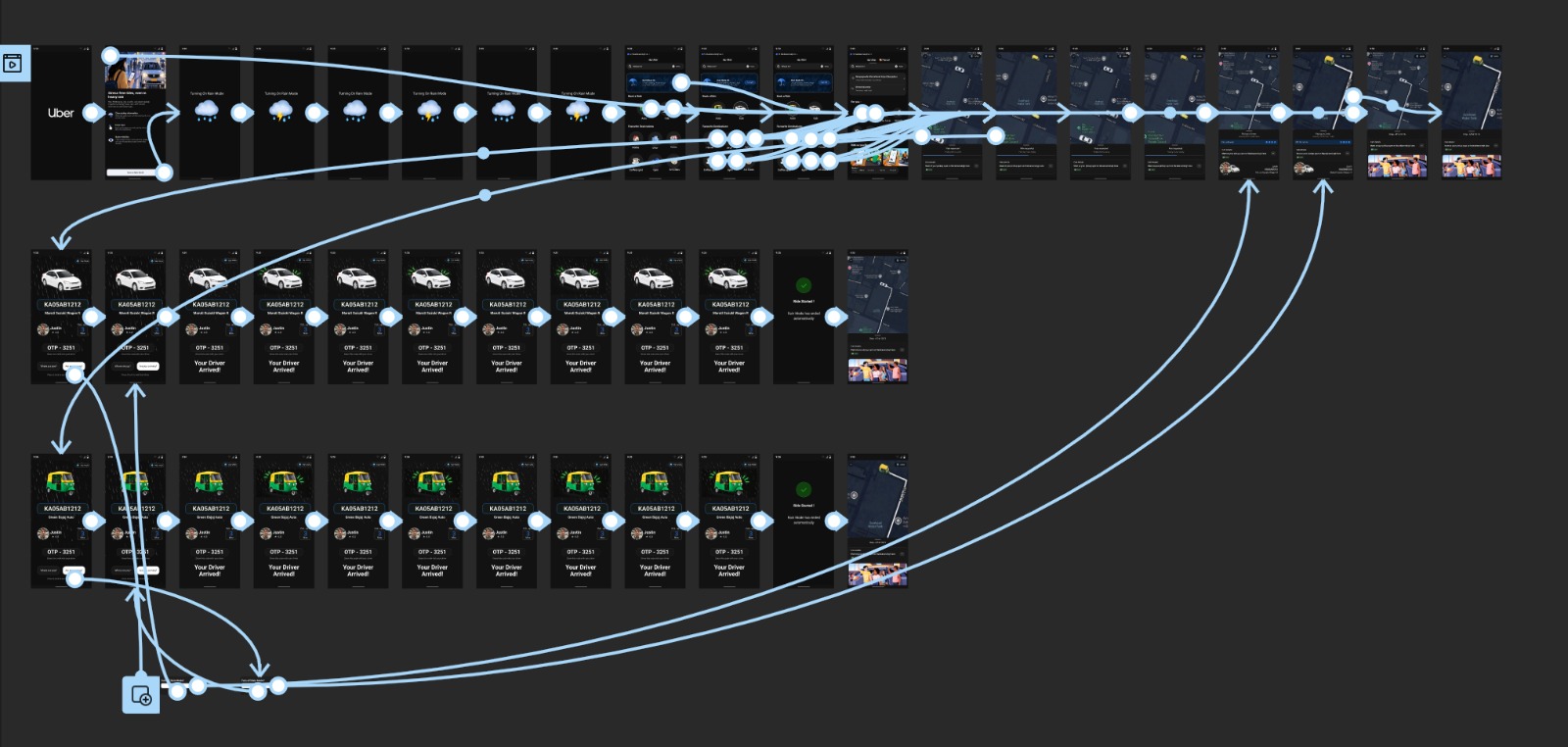
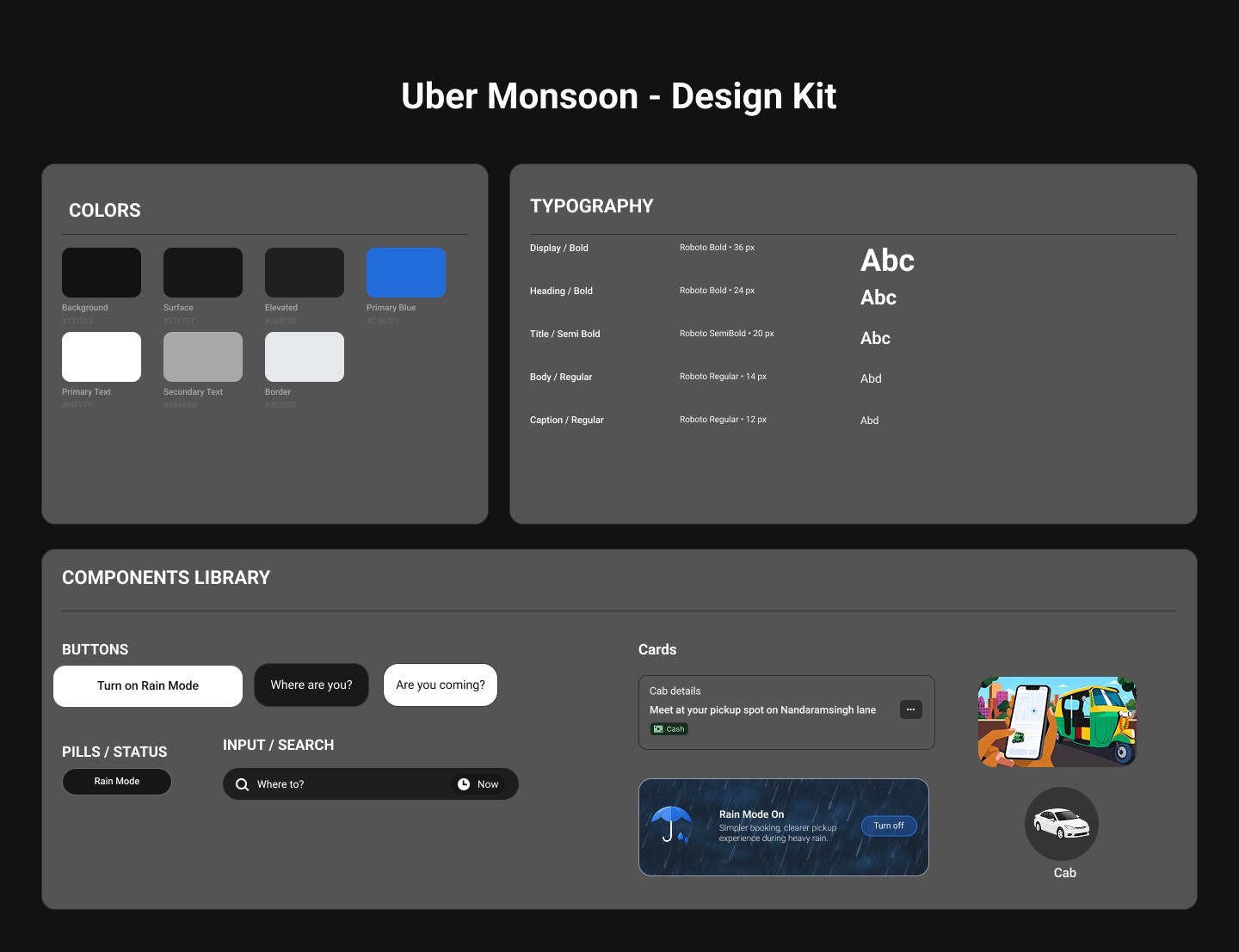
How Rain Mode could detect rain
Rain Mode uses location and weather context to identify when rain is occurring around the rider's pickup area. When an active ride is approaching pickup during rainy conditions, Uber can offer a temporary Rain Mode experience.
Usability testing and two iterations
Five riders evaluated the UI, accessibility and ease of use of the Rain Mode experience during heavy rain.
| Participant | Feedback | Key insight |
|---|---|---|
| 1 | Found the interface simple and easy to understand. Important ride information was clearly accessible. | UI was easy to understand |
| 2 | Found the interaction comfortable and felt the design worked well for the rainy situation. | Accessibility worked well |
| 3 | Found the UI clear and accessible. Had no difficulty navigating the key ride information. | Simple interaction was effective |
| 4 | Suggested making the ETA larger and more prominent so it is noticed immediately while waiting. | ETA needs stronger visual hierarchy |
| 5 | Also suggested increasing the ETA size so the remaining wait is easy to glance at. | ETA should be more glanceable |
Swipe the table to see every column →
- ✓Rain Mode prioritizes ETA, vehicle details, driver status and pickup location
- ✓Reduced unnecessary interaction and clearer information hierarchy
- ✓Easier one-handed interaction and faster access to critical ride information
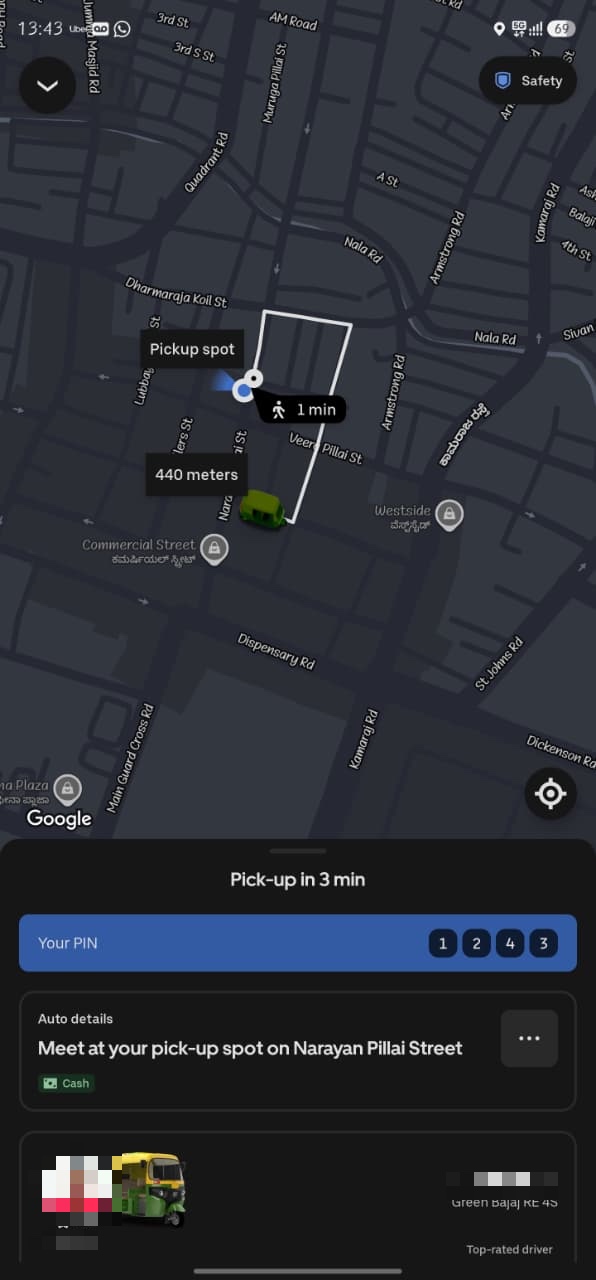
- ✓ETA became one of the most prominent elements on the Rain Mode screen
- ✓Stronger visual hierarchy and faster information scanning
- ✓Better support for glanceable interaction
From Rain Mode to a context-aware Uber
Rain Mode is designed around one principle: when the environment becomes difficult, the interface should require less from the user.
| Principle | Design approach |
|---|---|
| Reduce interaction | Minimize unnecessary taps and navigation |
| Improve visibility | Make ETA and vehicle information prominent |
| Support one-handed use | Use larger, easily reachable interaction areas |
| Improve pickup awareness | Strengthen arrival, vehicle and pickup communication |
Swipe the table to see every column →
Phase 1 · Rain Mode
Rain Mode activation, one-tap booking, large ETA and vehicle number, clear arrival alert, simple pickup guidance, visual + haptic alerts. Focus: reduce phone interaction.
Phase 2 · Smarter Pickup
Better pickup-point guidance, covered pickup suggestions, one-tap driver contact, clear pickup status, smarter arrival notifications. Focus: reduce pickup uncertainty.
Phase 3 · Context-Aware Uber
Weather-aware interface, personalized accessibility preferences, adaptive notifications, support for darkness, noise and crowded areas. Focus: reduce environmental barriers.
Accessibility isn't always about permanent limitations. Sometimes the environment creates the barrier — and Rain Mode responds by reducing interaction, improving visibility, and making it easier to find and reach the vehicle.